
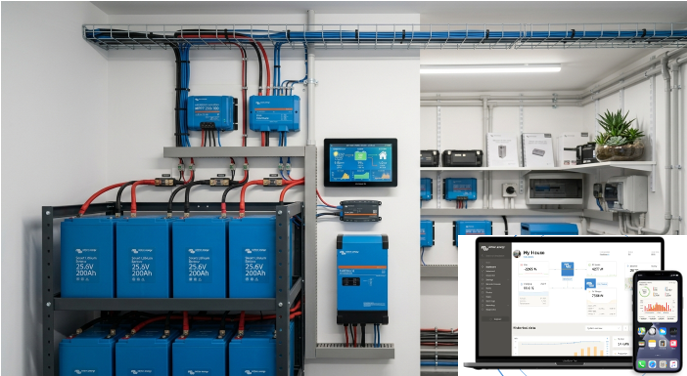
Within the Victron product lineup, GX is the name Victron uses for its system monitoring and communication platform devices. GX devices serve as the central hub for connecting and managing Victron equipment, but they are not required for system operation.
Most Victron devices already measure and report their own operating data directly to a GX device through VE.Direct, VE.Can, USB, or Ethernet. Examples include:
- MPPT Solar Charge Controllers – Report solar voltage, current, power, charging stage, historical yield, and more.
- MultiPlus / Quattro Inverter-Chargers – Report AC input/output power, inverter status, charger status, battery charging current, alarms, and loads.
- Orion DC-DC Chargers – Report charging status, voltage, current, and operating mode (for Smart models).
- Phoenix Smart Chargers – Report charging information and battery voltage.
- Lynx Smart BMS – Reports battery management information, contactor status, alarms, and battery protection status.
Batteries, however, require a Victron SmartShunt to accurately report battery information to a GX device unless the battery's built-in BMS supports direct GX communication. While some batteries with built-in BMSs can be configured to communicate directly with a GX device, BMS design and communication protocols are not standardized across manufacturers. As a result, reliability, accuracy, and overall compatibility can vary. Installing a Victron SmartShunt provides consistent, accurate battery monitoring and eliminates concerns about compatibility or inconsistent reporting.
Here is a list of the GX monitoring devices and what they bring to the table:
1. Cerbo GX
The Cerbo GX collects real-time data from connected devices, including the SmartShunt, MPPT solar charge controllers, inverter/chargers, and batteries, allowing you to monitor and manage your entire power system from one interface. It also enables remote monitoring through the Victron Remote Management (VRM) Portal and supports system automation and alerts. Screen for local monitoring is not included, can use phone, laptop or cerbo touch50 or touch70 screen.

https://solarsuperstore.ca/products/victron-cerbogx-mk2?_pos=1&_sid=0cb7ee74d&_ss=r
2. Ekrano GX
The Ekrano GX performs all the same functions as the Cerbo GX but features a built-in 7-inch touchscreen display. It provides live system information, configuration, and diagnostics directly at the installation without requiring an external display or mobile device, making it ideal for users who want convenient on-site monitoring.

3. Color Control GX (CCGX)
The Color Control GX is Victron's original system monitoring device. It provides centralized monitoring of connected Victron equipment and uploads system data to the VRM Portal for remote access. While it has largely been replaced by the Cerbo GX, it remains a reliable option for maintaining and monitoring existing Victron installations.
Solar super store nolomger stocks the Color Control GX
4. Victron GlobalLink 520
The GlobalLink 520 is designed for remote installations without internet access. Using its built-in LTE-M cellular connection, it automatically uploads battery and system data from compatible Victron devices to the VRM Portal, allowing users to remotely monitor off-grid systems such as telecom sites, weather stations, remote cabins, and solar-powered equipment.

5. VE.Direct to USB Interface
The VE.Direct to USB Interface connects a SmartShunt or other VE.Direct-compatible Victron device directly to a Windows, macOS, or Linux computer. It is commonly used for configuring device settings, performing firmware updates, troubleshooting, and logging long-term system performance through the VictronConnect software or third-party monitoring applications.

https://solarsuperstore.ca/search?q=VE.Direct+to+USB+Interface
Screening Options:
1. GX Touch Display (Optional) Touchscreen directly to the Cerbo GX
a) GX Touch 50

https://solarsuperstore.ca/products/victron-energy-bpp900455070-gx-touch-70?_pos=1&_sid=c72891a5e&_ss=r
b) GX Touch 70

2. Victron Remote Management (VRM) Portal
The Cerbo GX can connect to the internet via Ethernet, Wi-Fi, or an optional cellular modem and upload system data to the Victron Remote Management (VRM) portal.
Access the system using any web browser or the VRM mobile app.
This is one of the most popular monitoring methods for unattended or remote installations.
3. HDMI output
4. Connect to Local Network
5. Remote Console
The Cerbo GX includes a built-in Remote Console, which displays the full GX user interface on any compatible web browser.
Third-Party Monitoring Systems
The SmartShunt's VE.Direct communication protocol allows it to integrate with compatible third-party monitoring and automation systems, including PLCs, SCADA systems, Raspberry Pi projects, and home automation platforms. This enables users to create custom dashboards, automate equipment based on battery conditions, collect long-term performance data, and integrate battery monitoring into larger energy management systems.
For most users, the best combination is:
- A GX Touch display for convenient local monitoring and control.
- The VRM Portal for remote access and long-term performance monitoring.
- A smartphone or laptop for occasional setup, diagnostics, and configuration without needing a permanent display.
Disclaimer: This article is provided for informational purposes only and is not intended to be used as an engineering, design, or professional reference. Product prices, specifications, and availability are subject to change without notice.
While we strive to ensure the information is accurate, we make no representations or warranties regarding its completeness, accuracy, or reliability. We shall not be liable for any loss, damage, or consequences arising from the use of this information. Before making any purchasing, engineering, design, or other decisions, you should independently verify all information with the manufacturer or other reliable sources and, where appropriate, consult a qualified professional.